
Time Blocking vs To Do Lists is a great concept. I know exactly how it feels. You sit down at your home desk at 8:55 AM, coffee in hand, ready to crush the day. You scribble down a long list of tasks in your notebook. But by 5:00 PM, you look at that list and realize you’ve only crossed off two items—and neither of them was the big project you needed to finish.
The remote work life is a double-edged sword. We have the freedom to manage our own time, but often, that “freedom” turns into chaos. We bounce between Slack notifications, laundry, and emails, leaving us mentally drained.
If you are tired of ending your workday feeling busy but unproductive, the problem might not be your work ethic—it might be your system. Today, we are settling the debate: Time Blocking vs To Do Lists. Which method actually saves your sanity when you work from home?
Let’s dive into the psychology, the strategy, and the soulful approach to planning your day.
Table of Contents
The Remote Work Productivity Crisis
When I first transitioned to remote work, I thought I had hit the jackpot. No commute? Pajama pants? Yes, please. But within a month, my anxiety spiked.
Without the structure of an office—the physical cues that tell your brain “it’s time to work”—our boundaries dissolve. This is where the battle of Time Blocking vs To Do Lists begins. It isn’t just about getting things done; it’s about protecting your mental health.
SoulDairy Insight: Productivity isn’t about doing more things. It’s about doing the right things while maintaining your inner peace.
Read More 7 Bad Habits Killing Productivity You Must Break
The Classic To-Do List: The Good, The Bad, and The Dopamine
We all know the To-Do list. It’s the oldest trick in the book. You write tasks down, and you cross them off. Simple, right?
Why We Love It (The Psychology)
To-do lists are popular because they are low-effort and high-reward. Every time you check a box, your brain releases a hit of dopamine. It feels good. It feels like progress.
Pros:
- Simplicity: You just need a pen and paper.
- Flexibility: Great for days with unpredictable interruptions.
- Brain Dump: It clears your mental RAM by getting tasks out of your head.
The Hidden Trap
The problem with a simple list is that it lacks context.
- It doesn’t tell you how long a task takes.
- It treats “Email Mom” (5 mins) and “Write Q3 Report” (4 hours) as equal lines on a page.
- The Zeigarnik Effect: Unfinished tasks clutter your mind, leading to anxiety at the end of the day.
If you rely solely on a list, you are likely to do the easy tasks first (to get that dopamine hit) and procrastinate on the big, scary projects until 4 PM.
Time Blocking 101: Taking Control of the Clock
Time blocking is the exact opposite of the open-ended list. Instead of focusing on what to do, you focus on when to do it. You divide your day into blocks of time, and each block is dedicated to accomplishing a specific task or group of tasks.
Elon Musk and Bill Gates are famous for this. They schedule their days in 5-minute slots. While we don’t need to be that intense, the principle holds true.
Pros:
- ** combats Parkinson’s Law:** “Work expands to fill the time available for its completion.” If you give yourself 2 hours to write a blog, you’ll do it in 2 hours.
- Promotes Deep Work: You turn off notifications and focus on one thing.
- Reality Check: It forces you to see how much time you actually have vs. how much you think you have.
The Downside
Life happens. The Amazon delivery guy rings the doorbell, or your boss calls for an emergency meeting. If your calendar is too rigid, one interruption can knock down your whole schedule like dominoes, leading to frustration.
Cal Newport on Deep Work and Time Blocking
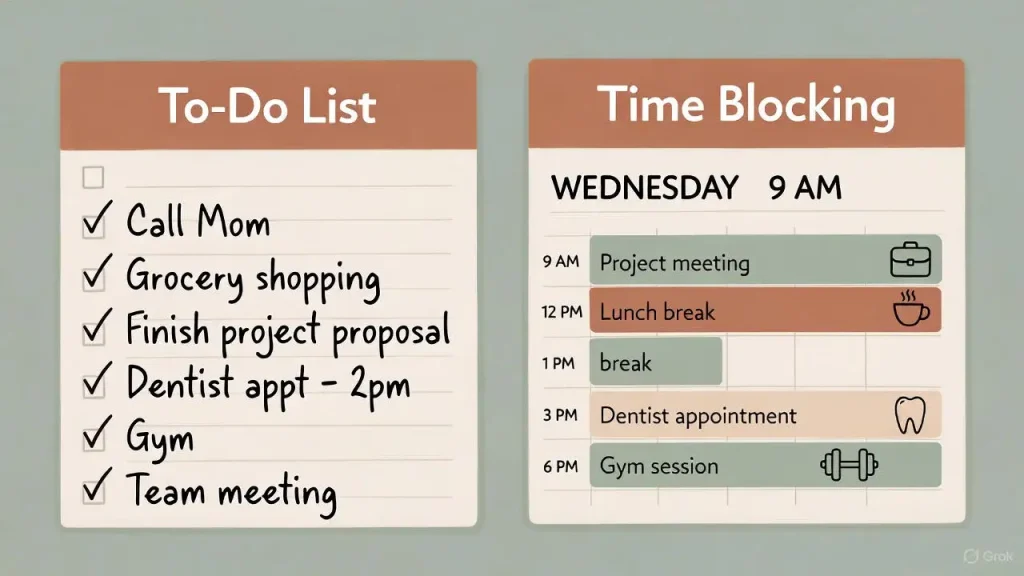
Time Blocking vs To Do Lists: The Ultimate Showdown
So, in the battle of Time Blocking vs To Do Lists, who wins? Let’s compare them based on remote work needs.
| Feature | To-Do Lists | Time Blocking |
| Structure | Low (Open-ended) | High (Rigid) |
| Flexibility | High | Low |
| Focus Level | Scattered (Multitasking risk) | High (Single-tasking) |
| Anxiety Relief | Immediate (Brain dump) | Long-term (Control) |
| Best For | Admin, small tasks, errands | Creative work, coding, writing |
Who Should Use To-Do Lists?
- Remote workers in reactive roles (Customer Support, Virtual Assistants).
- Parents juggling childcare with work.
- People who hate feeling “boxed in.”
Who Should Use Time Blocking?
- Writers, Designers, Developers (Makers).
- People who struggle with procrastination.
- Anyone who ends the day wondering, “Where did the time go?”
The SoulDairy Hybrid Method: How to Actually Get Things Done
Here is the secret that changed my life: You don’t have to choose.
The most effective remote workers use a hybrid system. A raw To-Do list is just a menu; Time Blocking is the actual meal plan. You need both to cook a good dinner.
Step-by-Step Hybrid Strategy:
- The Morning Brain Dump (10 Mins): Start with a To-Do list. Get everything out of your head.
- Prioritize (The Rule of 3): Circle the top 3 items that must happen today.
- Block the “Big Rocks”: Open your calendar. Create time blocks only for those top 3 items.
- The “Batch” Block: Create a 1-hour block called “Admin/Small Tasks.” This is where you attack the rest of your To-Do list (emails, calls, Slack).
- Leave White Space: Leave 30-minute buffers between blocks. You are human, not a robot. You need to stretch, grab water, or stare out the window.
Pro Tip: Color code your calendar. Use Green for Deep Work (revenue-generating), Blue for Admin, and Yellow for Self-Care/Breaks.
17 Productive Morning Routine Ideas for Success
🛑 Interactive Reflection
Take a moment to pause. Look at your current method of planning.
- Do you feel controlled by your schedule, or in control of it?
- Are you chasing checkmarks or chasing goals?
Grab a sticky note and write down your answer. Being honest is the first step to change.
FAQs: Productivity for Remote Workers
1. Is time blocking good for ADHD?
Yes! Time blocking provides external structure which the ADHD brain often lacks. However, keep the blocks short (25-45 mins) to avoid boredom. This is often called the Pomodoro Technique.
2. What if I miss a time block?
Forgive yourself immediately. This is crucial. If you miss a block, simply drag it to tomorrow or later in the day. Your calendar is a tool to serve you, not a prison to trap you.
3. Which app is best for time blocking?
Google Calendar is the gold standard because it’s free and integrates with everything. For To-Do lists, Todoist or Microsoft To Do are excellent. For a hybrid, try Notion or TickTick.
4. How long does it take to get used to time blocking?
It usually takes about two weeks to adjust. At first, you will likely underestimate how long tasks take. That is normal. Adjust your estimates as you learn your own pace.
5. Can I time block my personal life?
Absolutely. In fact, you should. Block out “Gym,” “Reading,” or “Family Time.” If it’s not on the calendar, it usually doesn’t happen.
Conclusion & Next Steps
When analyzing Time Blocking vs To Do Lists, there is no single “right” answer—there is only the answer that works for your brain and your lifestyle.
If you are feeling overwhelmed, start with the Hybrid Method. Use the list to capture the chaos, and use the blocks to execute the value. Remember, the goal of productivity isn’t to become a machine. It’s to finish your work efficiently so you have time for the things that actually feed your soul—like a walk in nature, time with family, or just a quiet moment with a good book.
What is your experience? Are you a “Lister” or a “Blocker”? Or have you tried the Hybrid method? Tell me about your struggles and wins in the comments below—I read every single one!